

 Facebbook
 Tiktok
 Youtube
 Zalo
Zalo Linkedin
 Investment community
 Instagram
VĂN HÓA DOANH NGHIỆP
EDU TRADE
Văn hóa doanh nghiệp là hệ giá trị, niềm tin, chuẩn mực ứng xử và cách làm việc mà mọi thành viên cùng chia sẻ, tạo nên “tính cách” riêng của Edu Trade.
Văn hóa Doanh nghiệp tại Edu Trade được cấu trúc theo 4 nhóm, đặt trọng tâm vào con người, sản phẩm/dịch vụ, giải pháp toàn diện và tính nhân bản, hướng đến sự phát triển bền vững cho khách hàng, nhân sự và cộng đồng.
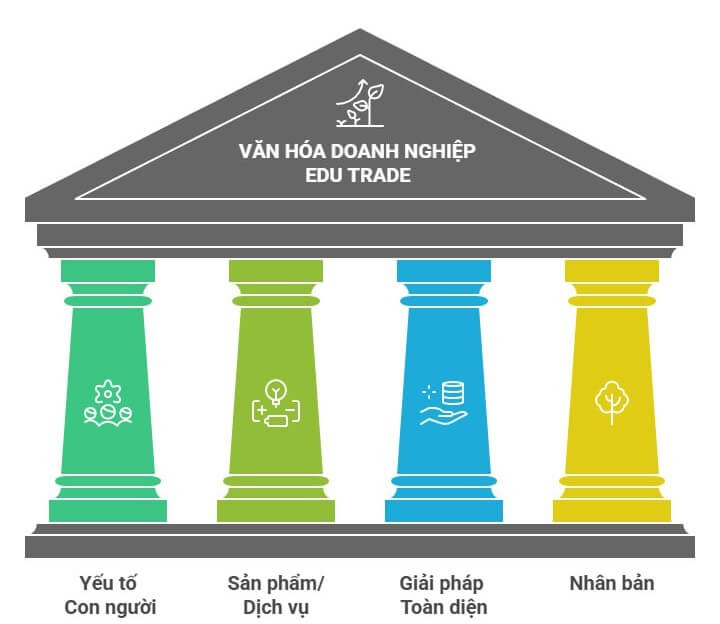
1. YẾU TỐ CON NGƯỜI
LẤY CON NGƯỜI LÀM TRUNG TÂM
“Khách hàng là trọng tâm, Nhân sự là nền tảng.”
- Nguyên tắc & Hành vi cốt lõi:
- Môi trường làm việc: Tôn trọng và trao quyền cho nhân viên “Respect for People”. Đề cao tính công bằng, minh bạch, “tôn trọng cá nhân – chính trực – hợp tác”.
- Vai trò Quản lý: Quản lý đóng vai trò huấn luyện viên, tạo điều kiện cho nhân viên phát triển năng lực.
- Hợp tác: Phối hợp làm việc nhóm, hợp tác liên phòng ban để giải quyết vấn đề cho khách hàng.
- Lắng nghe: Định hướng khách hàng trong mọi quyết định, xem “focus on the user/customer” là kim chỉ nam.
1.1. Khách hàng:
- Cam kết “tôn trọng người dùng”: luôn lắng nghe, thấu hiểu nhu cầu, bảo vệ dữ liệu và mang lại trải nghiệm vượt mong đợi, tương tự định hướng “respect the user” của Google.
- Lấy sự hài lòng của khách hàng làm thước đo thành công, duy trì mối quan hệ chân thành, tiếp nhận góp ý với thái độ khiêm tốn như cách các tập đoàn lớn coi khách hàng là trọng tâm.
1.2. Nhân sự:
Nuôi dưỡng văn hóa sáng tạo, khuyến khích nhân viên thử nghiệm, học hỏi liên tục, tương tự cách Microsoft chú trọng “innovation” và môi trường làm việc sáng tạo.
Đề cao đa dạng & hòa nhập: tôn trọng khác biệt, cơ hội công bằng cho mọi cá nhân, phù hợp xu hướng các tập đoàn toàn cầu về bình đẳng và đa dạng
2. SẢN PHẨM / DỊCH VỤ
HỮU ÍCH - ĐƠN GIẢN - TIN CẬY
“Sản phẩm/dịch vụ phải hữu ích, đơn giản, tin cậy và liên tục được cải tiến.”
- Nguyên tắc cốt lõi:
- Lấy trải nghiệm người dùng làm chuẩn, chúng tôi áp dụng tư duy “User-First” (Người dùng là trước hết).
- Chất lượng là danh dự và độ tin cậy ở mức cao.
- Đổi mới liên tục, xem sáng tạo là giá trị lõi.
- Dựa trên dữ liệu và phản hồi thị trường để cập nhật, tối ưu sản phẩm.
- Cam kết chất lượng:
- Chu kỳ cải tiến sản phẩm/dịch vụ định kỳ .
- Quyết định dựa trên dữ liệu.
- Đồng hành cùng khách hàng.
3. GIẢI PHÁP TOÀN DIỆN
ĐỒNG HÀNH TRỌN VẸN
“Không chỉ bán sản phẩm, mà mang đến giải pháp trọn vẹn, đồng hành lâu dài.”
Chúng tôi giải quyết vấn đề gốc rễ của khách hàng thông qua tư duy hệ sinh thái. Không dừng lại ở việc bán hàng, quy trình của chúng tôi là một vòng tròn khép kín từ thấu hiểu đến cải tiến sau triển khai.
- Nguyên tắc cốt lõi:
- Tư duy hệ sinh thái: kết nối sản phẩm, dịch vụ, hỗ trợ, công nghệ, cung cấp giải pháp tổng thể.
- Kết nối nhiều mảnh ghép (sản phẩm, dịch vụ, tư vấn, hậu mãi, đào tạo) để khách hàng có thể giải quyết trọn vẹn nhu cầu tại một nơi
- Hợp tác với đối tác, nhà cung cấp để mở rộng giá trị. Coi khách hàng là đối tác phát triển, lắng nghe mục tiêu dài hạn, cùng xây lộ trình giải pháp và liên tục tối ưu trong suốt vòng đời hợp tác.
- Hỗ trợ trước – trong – sau bán hàng với quy trình rõ ràng, đội ngũ chuyên gia và công cụ số hóa để nâng cao hiệu quả phục vụ, chăm sóc vòng đời trọn vẹn của khách hàng.
- Hành vi cụ thể:
- Quy trình tư vấn theo bước: Hiểu vấn đề – Thiết kế giải pháp – Triển khai – Đồng hành – Cải tiến.
- Xây thư viện giải pháp mẫu (Case study, Best practice) để nhân viên học và áp dụng nhanh.
- Thiết lập các gói dịch vụ theo ngành/ngách khách hàng cụ thể, thay vì chỉ bán lẻ từng sản phẩm.
- Sau mỗi dự án, tổ chức phiên “rút kinh nghiệm – cải tiến” có đủ các bên liên quan.
- Hệ sinh thái giá trị: Tư vấn, Công nghệ, Dịch vụ, Hỗ trợ trọn đời.
4. NHÂN BẢN
PHÁT TRIỂN BỀN VỮNG
“Phát triển kinh doanh song hành với phát triển con người và cộng đồng.”
Đạo đức và sự chính trực là nền tảng không thể thương lượng. Chúng tôi hướng tới mô hình “Lợi ích Ba bên”: Doanh nghiệp tăng trưởng, Nhân viên hạnh phúc và Cộng đồng thịnh vượng. Chính sách chương trình trách nhiệm xã hội (CSR) và bảo vệ người lao động được thực thi nghiêm túc.
- Nguyên tắc cốt lõi:
- Đạo đức & Chính trực: Tuân thủ đạo đức kinh doanh, tính chính trực và trách nhiệm xã hội làm nền tảng, tôn trọng môi trường, tuân thủ pháp luật và chuẩn mực nghề nghiệp.
- Trách nhiệm Xã hội: Ưu tiên các sáng kiến phát triển cộng đồng, giáo dục, môi trường, duy trì các hoạt động thiện nguyện và tổ chức các buổi workshop chia sẻ kiến thức, kinh nghiệm tại các trường Đại học/Cao Đẳng.
- Cân bằng Cuộc sống: Xây dựng môi trường nhân văn, quan tâm sức khỏe thể chất – tinh thần – gia đình của nhân viên.
- Minh bạch & Bảo vệ: Hướng tới tạo giá trị lâu dài cho nhân viên, khách hàng, cộng đồng – không chỉ lợi nhuận ngắn hạn.
- Hành vi cụ thể:
- Có quy tắc ứng xử rõ ràng, truyền thông thường xuyên và gắn với đánh giá hiệu suất.
- Duy trì các chương trình trách nhiệm xã hội (CSR) hoặc thiện nguyện gắn với ngành nghề lõi.
- Chính sách phúc lợi hướng đến cân bằng công việc – cuộc sống, sức khỏe tinh thần, các hoạt động gắn kết.
- Cơ chế bảo vệ người dám lên tiếng về hành vi không phù hợp.